
Manage Billing
The new Manage Billing feature makes it easier than ever for Account Owners to view and manage their billing details directly within webCemeteries. With this tool, you can quickly access invoices, payment history, and subscription details without needing to contact support.
Who Can Access Manage Billing
In order to have access to the portal, your email needs to be added by our team to our billing platform. Reach out to support to add an email for access to the portal.
This helps ensure sensitive billing data stays secure. Once your email has been added and given portal access, you can access the portal by visiting this link: https://webcemeteries.benjipays.com/ or, by following the steps below.
How to Access Manage Billing
Easily navigate to your billing information from within your account settings.
-
Log into webCemeteries.
-
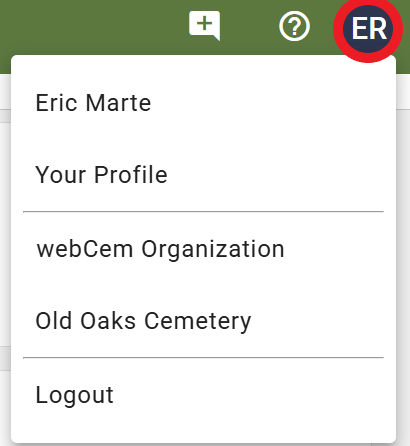
Click on your login icon in the top-right corner.
-
Select your Account name.
-
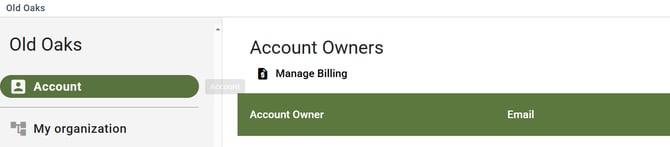
Go to the Accounts tab.
-
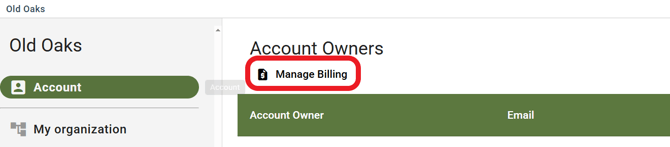
Click Manage Billing.
- You will be asked to Login to the billing portal with your account email.
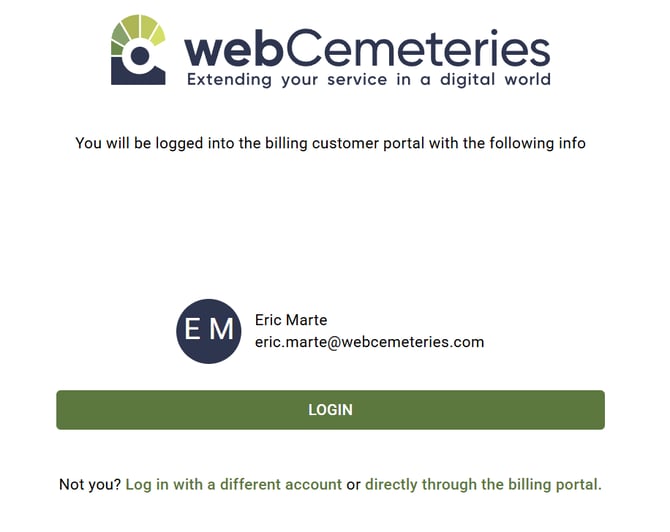
You will only have access if your email address has been added to your account's billing profile.
What You Can Do with Manage Billing
The Manage Billing section gives Account Owners more control and visibility over their account’s financial details.
Currently, if you need to update a card that has the same card number, but a new expiration date, we will need to do this manually. Please reach out to support desk for this.
Some capabilities listed in these articles may not be available.
Keeping your payment method up to date ensures uninterrupted access to all webCemeteries features.