---
title: How to Add a Tree Profile Photo in the Arboretum Module
description: Upload a picture for a tree, which can be seen in a Tour by your customers.
---
[Skip to content](https://support.webcemeteries.com/hc/en-us/articles/5642392137627-how-to-add-a-tree-profile-photo-in-the-arboretum-module#main-content)
[Submit a Request](https://support.webcemeteries.com/kb-tickets/new?hsLang=en)
[](https://support.webcemeteries.com/?hsLang=en)
Open main navigation
Close main navigation
- [Submit a Request](https://support.webcemeteries.com/kb-tickets/new)
How can we help you?
- There are no suggestions because the search field is empty.
1. [webCemeteries Knowledge Base](https://support.webcemeteries.com/?hsLang=en)
2. [Management](https://support.webcemeteries.com/management?hsLang=en)
3. [Arboretum Module](https://support.webcemeteries.com/management?hsLang=en#arboretum-module)
# How to Add a Tree Profile Photo in the Arboretum Module
### Step 1
Log into [webCemeteries Management](https://management.webcemeteries.com/).
### Step 2
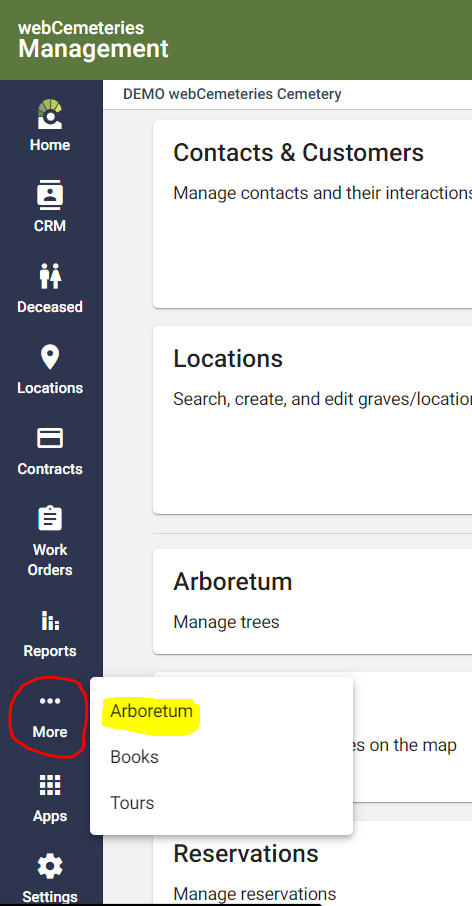
Hover over "...More" on the left side menu, and click "Arboretum".
### Step 3
[Search for the tree](https://support.webcemeteries.com/hc/en-us/articles/5642301761819-how-to-search-for-a-tree-in-the-arboretum-module?hsLang=en) or [add a new tree](https://support.webcemeteries.com/hc/en-us/articles/5642323668251-how-to-add-a-tree-in-the-arboretum-module?hsLang=en).
### Step 4
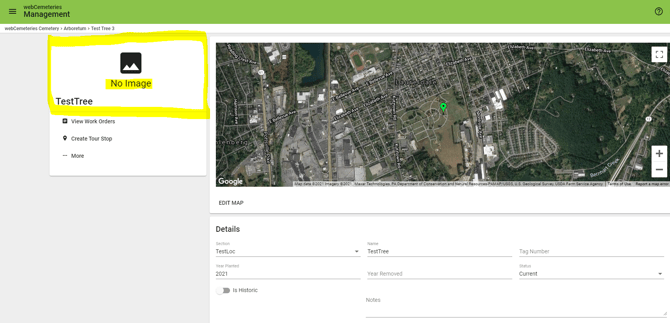
On the Tree Profile page, click the box to the left of the map to upload a tree photo.
### Step 5
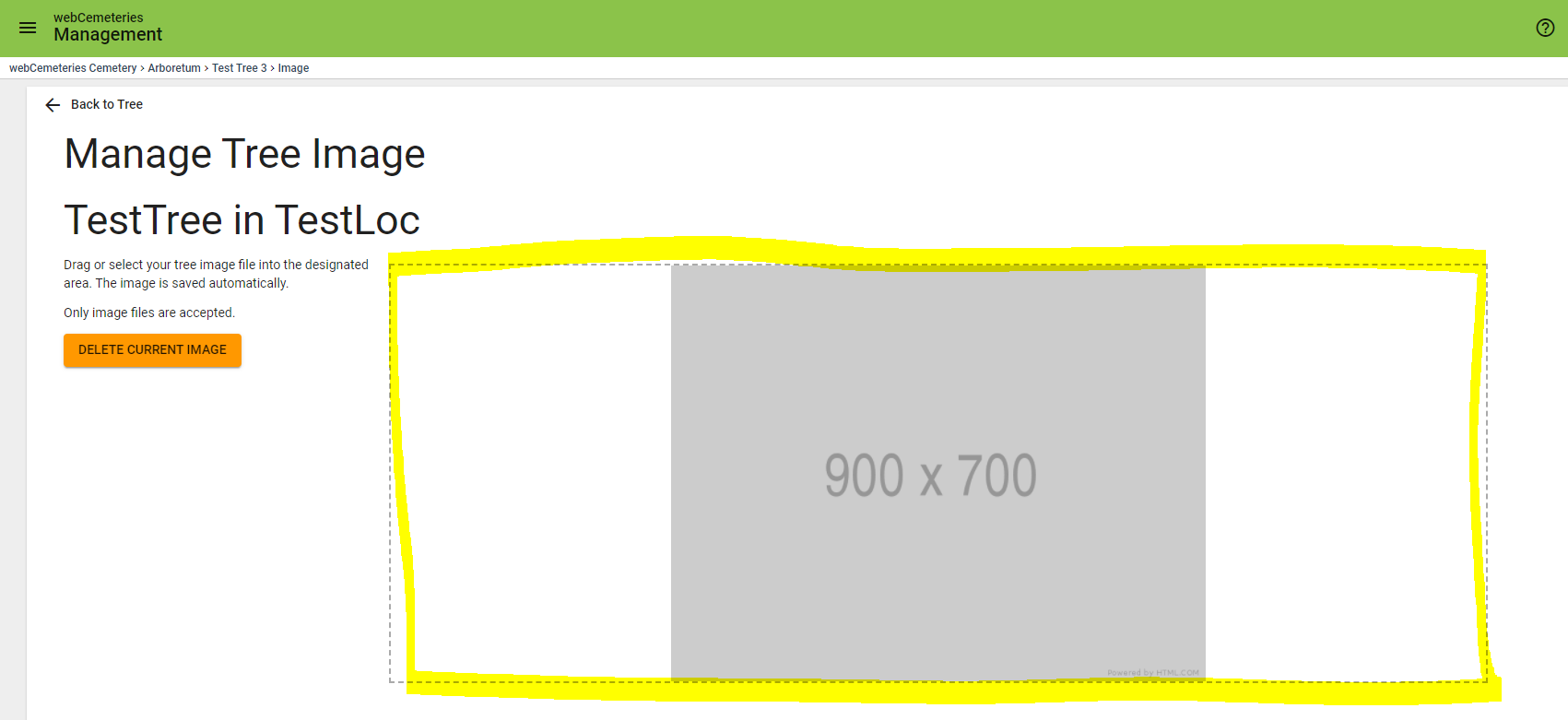
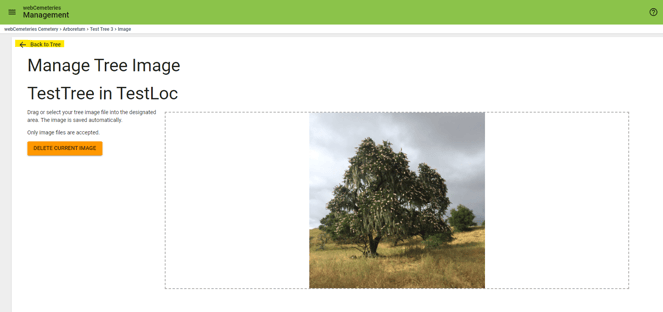
You will arrive at the **Manage Tree Image** page. The Tree Name (TestTree in this example) and Tree Section (TestLoc in this example) will show up as well.
### Step 6
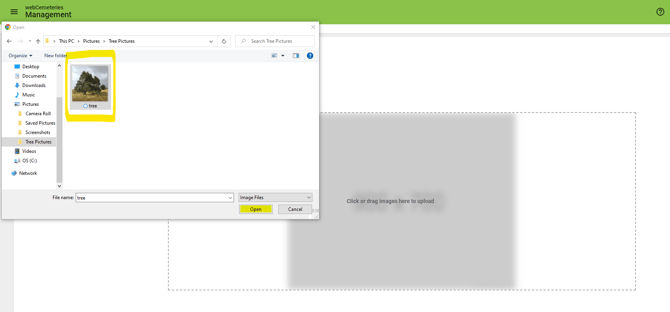
Drag an image into the box or click to upload a tree image.
**Adding a Photo from a Mobile Device**
If using a mobile device, you will be prompted to take a photo or upload a photo from your existing photo library.

### Step 7
Once you've uploaded the image, click "Back to Tree."
### Step 8
You will now return to the Tree Profile page. Make sure to click the orange "Save" button at the bottom right corner.

Video Demonstration
- [Getting Started](https://support.webcemeteries.com/getting-started?hsLang=en#main-content)
- [User Management Overview](https://support.webcemeteries.com/getting-started?hsLang=en#user-management-overview)
- [Settings Overview](https://support.webcemeteries.com/getting-started?hsLang=en#settings-overview)
- [Management](https://support.webcemeteries.com/management?hsLang=en#main-content)
- [Access and Usability](https://support.webcemeteries.com/management?hsLang=en#access-and-usability)
- [Arboretum Module](https://support.webcemeteries.com/management?hsLang=en#arboretum-module)
- [Books Module](https://support.webcemeteries.com/management?hsLang=en#books-module)
- [Contacts & Customers Module](https://support.webcemeteries.com/management?hsLang=en#contacts-customers-module)
- [Contracts Module](https://support.webcemeteries.com/management?hsLang=en#contracts-module)
- [Deceased Module](https://support.webcemeteries.com/management?hsLang=en#deceased-module)
- [Documents Overview](https://support.webcemeteries.com/management?hsLang=en#documents-overview)
- [Dynamic Forms Overview](https://support.webcemeteries.com/management?hsLang=en#dynamic-forms-overview)
- [Locations Module](https://support.webcemeteries.com/management?hsLang=en#locations-module)
- [Maps](https://support.webcemeteries.com/management?hsLang=en#maps)
- [Memorials Module](https://support.webcemeteries.com/management?hsLang=en#memorials-module)
- [Ownership Module](https://support.webcemeteries.com/management?hsLang=en#ownership-module)
- [Payment Processing](https://support.webcemeteries.com/management?hsLang=en#payment-processing)
- [Reports](https://support.webcemeteries.com/management?hsLang=en#reports)
- [Reservations Module](https://support.webcemeteries.com/management?hsLang=en#reservations-module)
- [Work Orders Module](https://support.webcemeteries.com/management?hsLang=en#work-orders-module)
- [Invoices](https://support.webcemeteries.com/management?hsLang=en#invoices)
- [Passare](https://support.webcemeteries.com/management?hsLang=en#passare)
- [Sales](https://support.webcemeteries.com/sales?hsLang=en#main-content)
- [General Access in Enterprise Sales](https://support.webcemeteries.com/sales?hsLang=en#general-access-in-enterprise-sales)
- [Contracts in Enterprise Sales](https://support.webcemeteries.com/sales?hsLang=en#contracts-in-enterprise-sales)
- [Reservations in Enterprise Sales](https://support.webcemeteries.com/sales?hsLang=en#reservations-in-enterprise-sales)
- [Searching in Enterprise Sales](https://support.webcemeteries.com/sales?hsLang=en#searching-in-enterprise-sales)
- [Public Tools](https://support.webcemeteries.com/public-tools?hsLang=en#main-content)
- [Remember My Journey](https://support.webcemeteries.com/public-tools?hsLang=en#remember-my-journey)
- [Mobile App](https://support.webcemeteries.com/public-tools?hsLang=en#mobile-app)
- [Tours](https://support.webcemeteries.com/public-tools?hsLang=en#tours)
- [Forever Plot](https://support.webcemeteries.com/public-tools?hsLang=en#forever-plot)
- [Uncategorized](https://support.webcemeteries.com/uncategorized?hsLang=en)
- [Website Integrations](https://support.webcemeteries.com/website-integrations?hsLang=en)
[](http://webcemeteries.com)
277 Fair St., Suite 1, Kutztown, PA 19530
[mailto:support@webcemeteries.com](mailto:support@webcemeteries.com)
Copyright © 2024, webCemeteries ™